
Forwarding confirmed
You've chosen to Forward your return: here's what happens next
Immediately after choosing Forward
Consumer Experience
Forwarding adds one option to your existing return flow. Here is exactly what that looks like, for the consumer returning an item and for the consumer buying one.
43%
of senders choose to Forward when offered the option
4.8/5
average buyer satisfaction rating
Zero
IGF accounts, apps, or registrations required
43%
of senders choose to Forward when offered the option
4.8/5
average buyer satisfaction rating
Zero
IGF accounts, apps, or registrations required
Live client data, Kuyichi 2025. Adoption and satisfaction: live data. Accounts: structural.
The Kuyichi return portal is live. Walk through the consumer experience in five minutes.
What actually changes
Forwarding adds one new option to the return flow your customers already use. Everything else stays exactly as it is today: same checkout, same product pages, same return portal, same packaging, same shipping. The detail below covers that one new option in full — but the journey itself is almost unchanged.
The complete consumer journey
Browse and buy
Unchanged
Receive item
Unchanged
Choose return type
+ Forward option added
Ship return
Unchanged
Get refund
Unchanged
Browse and buy
UnchangedReceive item
UnchangedChoose return type
+ Forward addedShip return
UnchangedGet refund
UnchangedOf the five steps in your customer's journey, only one changes — and only by adding an option, not by removing or replacing anything.
The rest of this page covers what that one new option looks like, in detail. Read on if you want depth on the specific moment of change.
The sender, who is returning an item and chooses to Forward it. And the buyer, who purchases that item at a discount. Their experiences are separate and independent. Here is each one.
When a consumer initiates a return through your portal, the Forwarding option appears alongside the conventional warehouse return with equal prominence, neither pre-selected. The consumer chooses. At Kuyichi, 43% choose Forward. Here's what those 43% experience next.
The sender starts a return through your existing return portal or webshop. Nothing about this step is different from a conventional return. They select the item, choose a return reason, and proceed.
Forwarding only appears after the return reason is selected. If the reason is 'damaged', Forwarding is not shown: the consumer goes straight to conventional return.
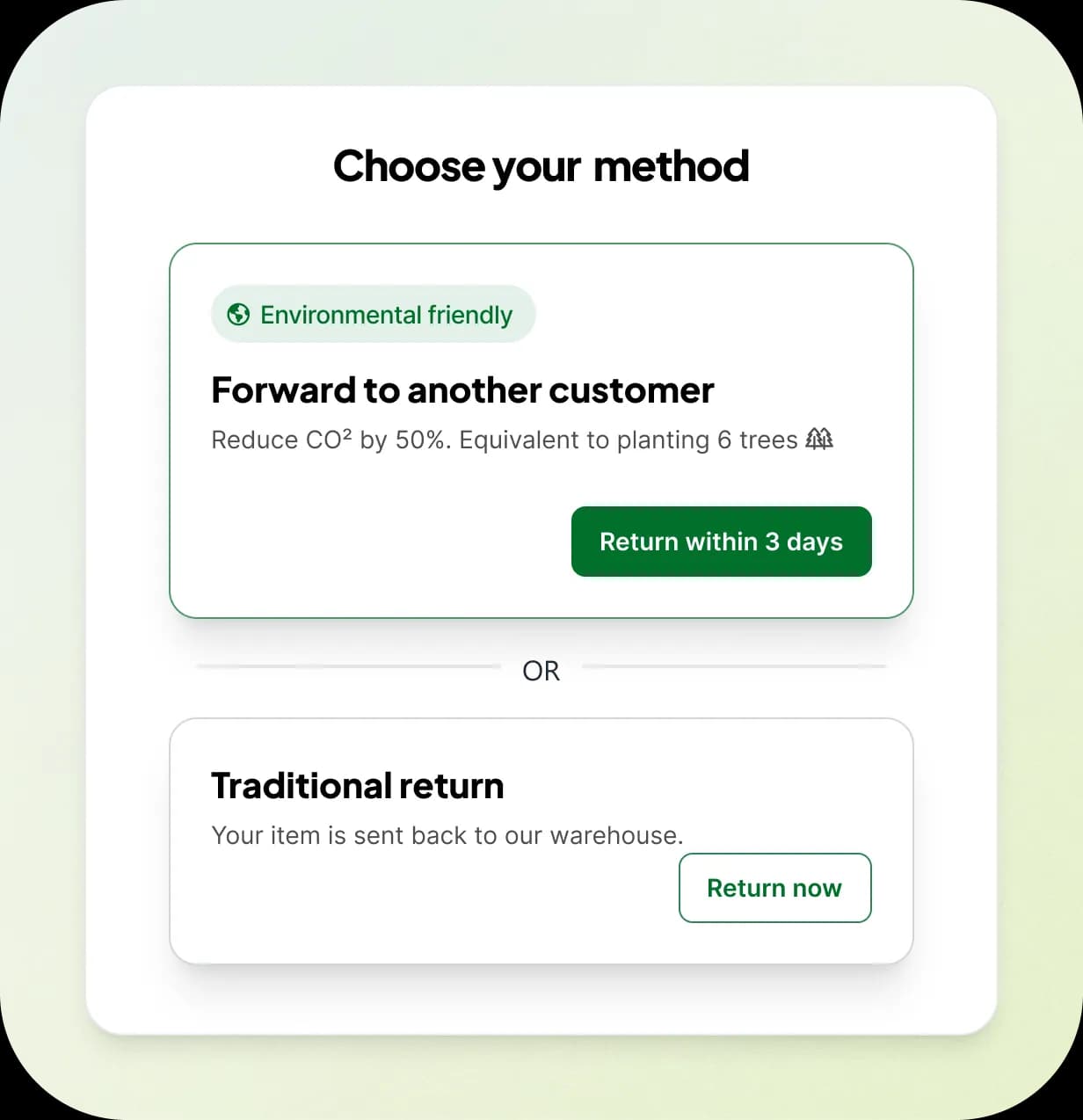
On the 'Choose your return method' screen, two options are shown side by side: 'Forward to another customer' and 'Traditional return'. Both are clearly explained. Neither is pre-selected; the consumer chooses.
In the live Kuyichi portal, the Forward option shows: cost (lower than conventional return), CO₂ saving, and a note that the refund is triggered by the buyer's positive rating. The comparison makes the Forward option clearly more attractive for eligible consumers.
If no incoming order for the same product exists yet, the sender holds the item at home and waits for a match, up to 7 days. If an incoming order already exists (common for high-volume SKUs), the match is instant: the shipping label is generated immediately, no holding period. The system tells the sender which path applies at the moment they choose Forward.
We configure per-SKU eligibility and expected match speed with you at onboarding, based on actual sales velocity. For high-volume SKUs this wait disappears entirely, see the no-waiting path below.
When a new order for their product comes in and the algorithm matches it to their return, the sender receives an email notification. The email contains a link to the match details and a button to generate the shipping label.
Example subject line (customisable per retailer): 'Your item has been matched: generate your shipping label'. The email is sent from your webshop's email address, branded as yours, not as IGF.
Before the label is issued, the sender is prompted to submit photos of the item. Once submitted, the shipping label is generated. The label shows the carrier's address but not the buyer's personal address; the buyer's privacy is fully protected.
The label is delivered as a downloadable URL. The sender prints it and attaches it to the original packaging. No new packaging is required.
The sender drops off the package at any carrier location (DHL or PostNL), same as a conventional return. The handoff process is identical. They receive a tracking confirmation.
If the sender does not ship within 3 days of the label being issued, the system automatically cancels the Forward and redirects to conventional warehouse return. No sender is left in limbo.
Once the buyer confirms the item arrived in good condition (or automatically after 3 days with no dispute), the sender's refund is triggered. The refund is processed through your standard refund system.
The refund mechanism is the key quality incentive: the sender knows their refund depends on the buyer's satisfaction. This aligns financial interests with good behaviour.
Example subject lines, customisable per retailer. All six triggers are wired and live in the Kuyichi implementation.
Forwarding confirmed
You've chosen to Forward your return: here's what happens next
Immediately after choosing Forward
Match made
Your item has been matched: generate your shipping label
When a buyer is matched
Match deadline reminder
Reminder: ship your Forward within 24 hours
If label not generated near deadline
Match deadline passed
Your Forward window has closed: here's how to return normally
If 3 days pass without shipping
Forward registered
Your Forward is on its way: refund incoming
When shipment is confirmed
Return cancelled
Your return has been cancelled: here's how to proceed
If the Forward is cancelled for any reason
All emails are sent from your webshop's email address and can be customised with your brand tone and language. IGF is invisible in the consumer communication.
Buyers see the Forward option on your product page, inline with warehouse stock. It's labelled clearly, no hidden second-hand section, no separate checkout flow. At Kuyichi, 65% of buyers who see a Return deal choose it. Here's what those 65% experience.

When a Forward listing exists for a product, buyers see an additional purchase option alongside the standard warehouse stock. It is labelled clearly as a returned item available at a discount, for example 'Return deal, Save 20% and reduce CO₂'. This appears on the product page, not on a separate pre-loved section.
On the live Kuyichi product page, the buyer sees two radio options: 'Shipped from our warehouse' and 'Return deal: Sent directly from another customer, Save 20% and reduce CO₂'. The buyer is fully informed before adding to cart.
The buyer adds the Return deal to their cart and checks out through your standard checkout. There is no separate payment flow, no IGF account to create, no different checkout experience. They pay through your existing payment system.
The discount is applied automatically. The buyer pays the discounted price. Your standard payment provider (Mollie or otherwise) processes it.
Standard order confirmation from your webshop. The email notes that the item will be shipped directly from another customer, and shows the CO₂ saving from doing so.
Delivery time is slightly longer than warehouse fulfilment: the sender has up to 3 days to ship. Buyers see an estimated delivery window that accounts for this. If the sender doesn't ship in time, warehouse fulfilment is triggered automatically and the buyer experiences no disruption.
The item arrives in its original packaging, shipped by the sender. The buyer does not see the sender's name or address; the shipping label is designed for consumer privacy. The delivery experience is the same as any other order.
The buyer is buying a 'like-new' item from another consumer, similar to buying an open-box item. The discount compensates for the reduced unboxing experience. Our live data shows 4.8/5 buyer satisfaction.
After receiving the item, the buyer is asked to rate the condition. A positive or neutral rating triggers the sender's refund automatically. If they rate it negatively or raise a dispute, the refund is held and the issue is investigated.
The rating is simple: thumbs up / thumbs down, with an optional comment. It takes under 10 seconds. Most buyers rate positively, at 4.8/5 average across all live Forwards.
If the buyer is unhappy with the item for any reason, they have exactly the same right of return as any normal purchase. They can return it to the warehouse, or if condition still qualifies, Forward it to the next buyer. Your standard return policy is fully preserved.
In practice, buyers who choose Forward use their return rights less, not more. 21% return rate on Forwarded items, versus ~38% industry average for fashion. Self-selection effect: buyers who knowingly chose a returned item at a discount have lower return intent to begin with.
Select purchase option
Shipped from our warehouse
Standard delivery, 2-3 business days
Return deal
Save 20% and reduce CO₂Sent directly from another customer
Recreated from the live Kuyichi webshop. The Forward option appears inline on the product page, with no separate pre-loved section.
For low- to mid-volume SKUs, the sender holds the item for up to 7 days waiting for a match. This is the main behavioural difference from a conventional return and the main reason some consumers will prefer the conventional option. We do not pretend this is frictionless.
What makes it acceptable: the Forward option costs the consumer less than the conventional return (at Kuyichi: €4,00 vs €6,00). The environmental benefit is shown. The refund process is explained. And 43% of consumers, having seen all of this, choose to wait. The 57% who prefer the conventional option choose it. Both paths work.
Research by Wiersma and Hsieh (VU Amsterdam) found that the matching window length affects participation: longer windows reduce it. This informed our default 7-day window and the option for retailers to configure shorter windows for time-sensitive categories.
The consumer experience concern typically comes before any live data exists. Here is what Kuyichi's first months of live Forwarding actually showed.
43%
of eligible senders chose to Forward rather than return to warehouse
Kuyichi live data, 2025
65%
of buyers purchased the Forward option when it was offered to them
Kuyichi live data, 2025
4.8/5
average buyer satisfaction rating on Forwarded purchases
Kuyichi live data, 2025
98%
of items arrive in good condition (positive or neutral buyer rating)
Kuyichi live data, 2025
21%
return rate on Forwarded items, vs ~38% industry average
Kuyichi live data, 2025 vs NRF industry average
0
formal complaints about receiving a used or incorrect product
Kuyichi live data, Feb–Apr 2025
43%
of eligible senders chose to Forward rather than return to warehouse
65%
of buyers purchased the Forward option when it was offered to them
4.8/5
average buyer satisfaction rating on Forwarded purchases
98%
of items arrive in good condition (positive or neutral buyer rating)
21%
return rate on Forwarded items, vs ~38% industry average
0
formal complaints about receiving a used or incorrect product
All figures: Kuyichi live data, 2025. 21% return rate compared against NRF industry average.
The complaints we do receive from senders are about packaging: how to fold items, whether to use the original bag. We address this through guidance in the return flow and continue to improve it. It does not affect product condition.
The academic research underlying Forwarding explicitly notes that the concept is similar to Vinted: peer-to-peer product transfer between consumers. Vinted has over 100 million registered users in Europe. The behaviour of holding an item, shipping it to an anonymous buyer, and receiving payment is familiar to a large share of your consumer base.
The key difference from Vinted: in Forwarding, the retailer manages the entire process. The consumer does not need to photograph, list, negotiate, or wait for a buyer themselves. They simply choose 'Forward' and the platform handles everything else. It is Vinted's concept with none of Vinted's effort.
“A significant proportion of respondents are willing to participate in the C2C returns program for little or no monetary benefit. Self-esteem, altruism, and contributing to a better environment appear to be sufficient motivation.”
Eruguz, Van Heijst et al., Omega 128, Elsevier, 2024, citing consumer research by Wiersma and Hsieh (VU Amsterdam)
When an SKU sells multiple times per day, we flip the sequence. A buyer purchases the Forward option first; the demand is already there. The next consumer to return that same SKU is matched instantly, and the shipping label is generated on the spot with the buyer's address. No waiting for a match. No holding period. The sender ships it directly to the buyer, same as any carrier drop-off.
This works because high-volume SKUs have predictable demand: there is always a buyer queued up. For these categories the friction disappears entirely. We configure per-SKU eligibility with you at onboarding, based on your actual sales velocity.
The consumer experience is white-labelled and configurable. Your brand, your tone, your return portal, not ours.
No. Everything happens inside your existing return portal and webshop. Consumers interact only with your interface. There is no IGF login, no separate app, no registration.
If no match has been made yet, the consumer can cancel the Forward and switch to a conventional return. Once a match is made and a label issued, cancellation is more complex, but the warehouse fallback exists for cases where the sender simply does not ship.
It is shown alongside the conventional return option with equal prominence. Neither option is pre-selected. The Forward option typically shows its advantages clearly (lower cost, CO₂ saving) which is why 43% of consumers choose it. We do not nudge or dark-pattern the choice.
English, Dutch, and German are supported. The return portal and all consumer emails are localised. If your consumers are primarily Dutch, they see Dutch. Additional languages can be added: contact us.
The item is declared like new by the sender, documented by photos before label issuance, and backed by the sender's financial incentive to send it in good condition. The buyer also has a full right of return. Our live buyer satisfaction rating is 4.8/5: the experience meets or exceeds expectations for the large majority of buyers.
After 3 days without a shipment, conventional warehouse fulfilment is automatically triggered for the buyer's order. The buyer experiences no disruption; they simply receive their item from the warehouse instead. No intervention required from your team.
No, the opposite. Our live data shows a 21% return rate on Forwarded items, compared to the industry average of approximately 38% for fashion. Buyers who consciously chose a returned item at a discount have lower return intent.
No. The option is self-explanatory at the point of return. The consumer sees two clear choices (Forward or warehouse return) with their costs, timing, and impact shown side by side. They understand what they're choosing without any prior knowledge. Retailers who want to go further often add a short FAQ entry or a link from their sustainability page, but this is optional. The mechanism sells itself once consumers see it.
The Kuyichi return portal is live at kuyichi.itgoesforward.com, our hosted return portal white-labelled as Kuyichi. Alternatively we can integrate into your existing return portal (Returnless, Bleckmann, custom) so it stays on your domain.